Track subscriber clicks with ReachMail's link tracking and custom domains to maintain brand consistency.
Link tracking allows ReachMail to record which subscribers click links in your emails.
- When enabled, all links in your campaign are converted into unique tracking links
- When a subscriber clicks a link:
- They are routed through a ReachMail server
- The click is recorded
- They are then redirected to the final destination
- Click data is available in your mailing reports
Custom Tracking Domains
- Let you use your own preferred domain for tracked links
- This domain acts as the visible alias instead of the default ReachMail domain
How does it work?
- Example: Your email includes a link to acmecompany.com
- With standard link tracking:
- The original link is replaced with a ReachMail tracking domain
- Example: go.rm0001.net
- With a custom tracking domain:
- The original link is replaced with your own domain
- Example: links.acmecompany.com
How do I set up custom tracking?
Setup Requirements
- Enabling custom tracking requires changes to your domain’s DNS
- If unsure, consult an IT specialist before proceeding
DNS Configuration
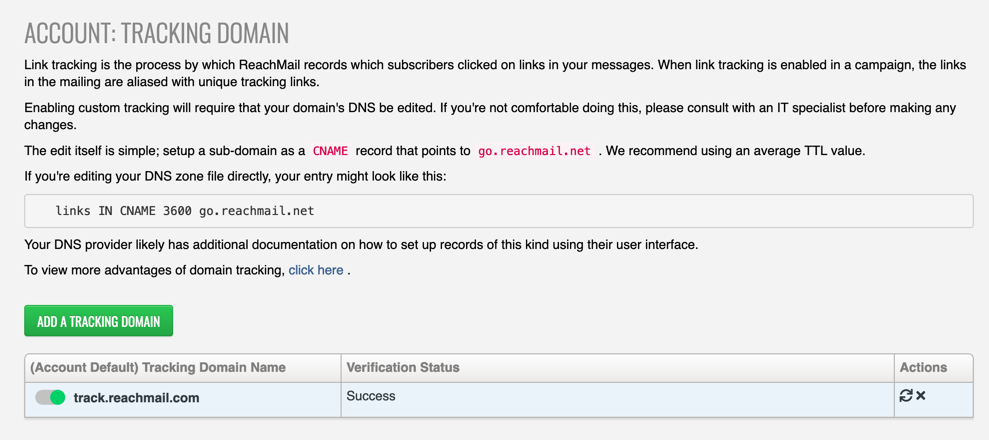
- Create a subdomain as a CNAME record
- Point it to: go.reachmail.net
- Use a standard/average TTL value
Example DNS Entry:
links IN CNAME 3600 go.reachmail.net
- Your DNS provider may have its own UI and documentation for adding records
Setting Your Tracking Domain in ReachMail
- Go to Account
- Select Campaign Settings
- Click Tracking Domain
- Choose Set Account Tracking Domain
- Enter your desired domain
Verification & Management
- Verification Status:
-
Red = issue with setup/verification
- Available actions:
- Enable domain
- Disable domain
- Re-verify domain
Note: Adding this CNAME allows ReachMail to your custom domain for link tracking. It does not create a secure (HTTPS) link tracking domain. A secure link tracking domain requires additional configuration.
